Substantive Post #3: From Theory to Practice
Before this module, I thought of accessibility as adding features like ramps or captions after design. Now I see it as the foundation. This aligns with the social model of disability, which shows that barriers often come from design choices, not from people themselves. This was a key insight for me; it shifted my focus from fixing individual limitations to fixing the environments I create.
Accessibility as Inclusive Design
Accessibility means designing from the start for diverse needs. For example, captions help deaf learners, but also those in noisy places or learning a new language. Personally, I always use subtitles to catch dialogue in fast-paced shows – a small habit that shows how “niche” supports help everyone. This is inclusive design—reducing mismatches between learners and their environment. The reading on accessible multimedia emphasized that good design isn’t about removing creativity, but about expanding how meaning can be communicated. This challenged my initial worry that accessibility might limit creative options.
Accessibility Enables Active Learning
For active learning to happen, learners must first access the material. No captions trap deaf students in passive roles. No keyboard support locks some out. Accessibility opens the door. This connects directly to what we learned about the ICAP framework: engagement moves from Passive to Interactive. But you can’t move up if you can’t get in the door at the first level.
This connects to the ICAP framework:
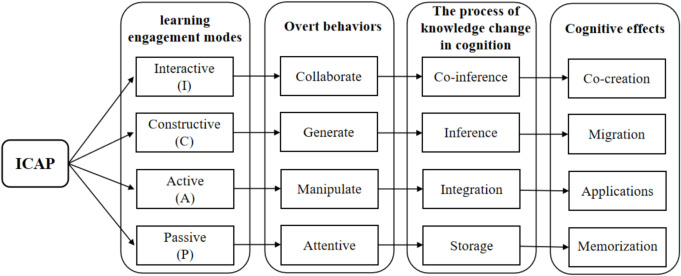
Seeing this diagram changed my thinking. It turned accessibility from a nice-to-have list into a clear mental map. My job is to build paths that let learners climb from Passive receiving, to Active note-taking, Constructive creating, and Interactive discussion. For instance, a simple accessible practice like adding a transcript to a podcast doesn’t just make it available, it transforms it. A learner can now actively highlight that transcript, constructively summarize it, or use quotes from it in an interactive forum discussion.
UDL and Multimedia in Practice
Media naturally supports UDL by offering multiple ways to engage:
· Text: Use headings and alt text.
· Images: Describe the meaning, not just the content (“a chart showing 40% more participation”).
· Video: Include captions and transcripts—crucial for over 1.5 billion with hearing loss.
The course reading on UDL guidelines helped me see these not as separate tips, but as connected parts of a system aiming to serve the variability of all learners.
A Powerful Demonstration
Merrill’s “demonstration” principle is about showing how things work. The video below on making PowerPoint accessible does just that, and practices what it teaches with its own captions.
Watching this, I realized the best lessons are what they teach. Beyond captions, the video also uses clear visuals and step-by pacing—practicing the UDL principles it explains. Specifically, its step-by-step pacing aligns with the guideline to “guide information processing,” reducing unnecessary cognitive load. This made me ask: “Have I ever created teaching material that didn’t follow its own advice?” Reflecting honestly, I have like using color-coded charts without legends, assuming everyone would interpret them the same way.
My Action Plan & A Lingering Question
Moving forward, I will:
1. Describe the message of every image/video.
2. Ensure activities work with keyboards.
3. Use proper headings (H2, H3).
4. Pair charts with text summaries.
5. Always ask: “Does this help learners move from Passive to Constructive?”
This brings up a real tension: UDL encourages multiple paths, but Merrill’s problem-solving can feel like one clear path. In practice, I’ll need to balance giving choices without creating confusion. My current thinking is to use UDL’s flexibility within the boundaries of a well-defined Merrill-style problem. For example, in a project, the core problem is fixed, but the format for the solution (report, video, prototype) can be a choice.
Conclusion
My core question is now: “Who might be left out?” Asking this from the start is the only way to design experiences that are truly inclusive and effective. This module changed how I think about accessibility. I no longer see it as just a technical requirement, but as a core part of ethical and effective learning design.